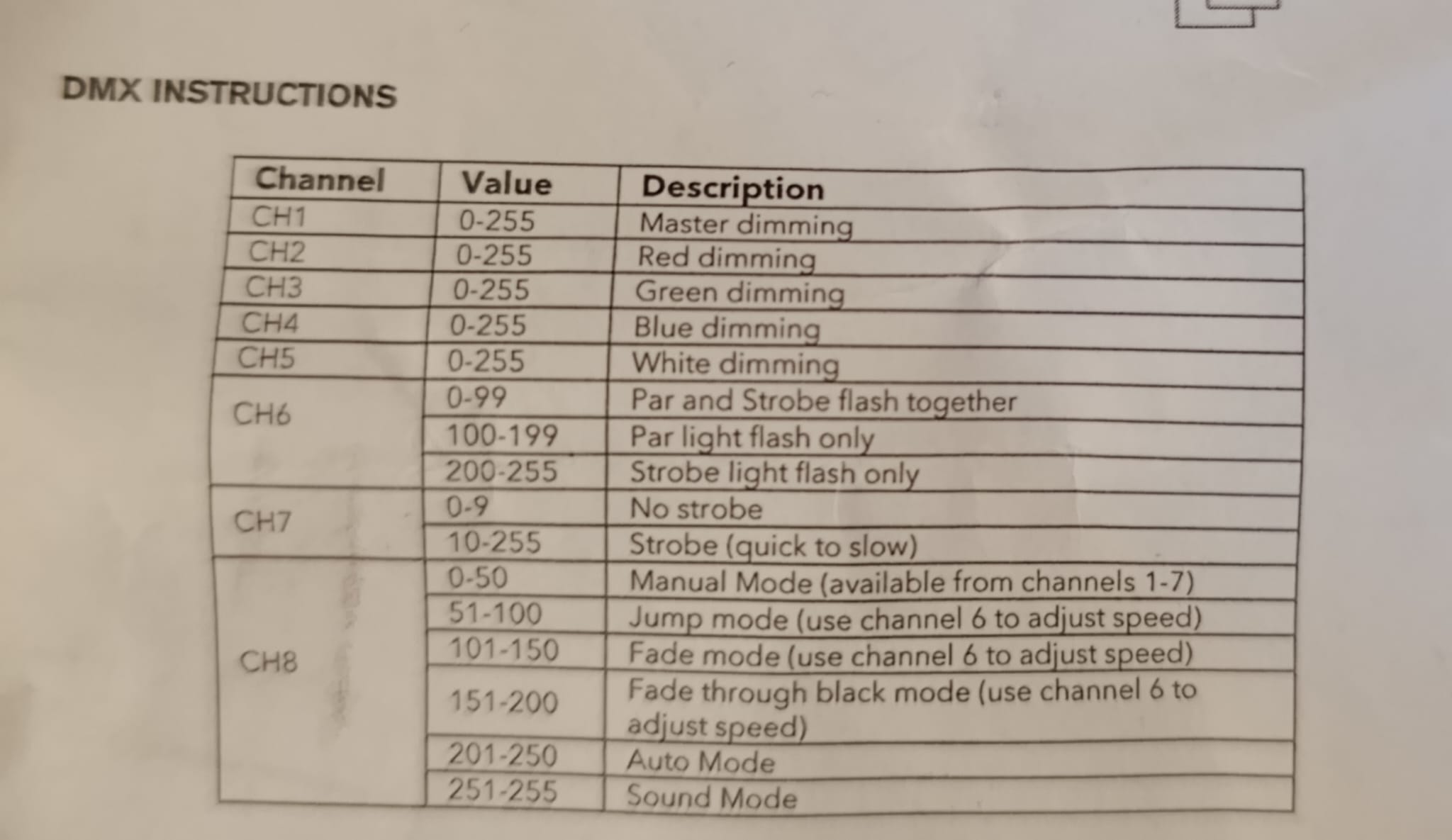
Hi, I’m currently trying to create the fixture profile of a very simple light (Gear4Music SOL-PARTY-12S) for my first tryouts with Beam for Max (I use Max 8.5). I’ve been trying at the fixture editor multiple times with slightly different variations, but I keep encountering the same issue. The light has a rgbwi colour mapping and, for some reason, using the fixture profile in Max always results on the Master dimmer/Intensity and White channels being mixed together into “dim”. I checked the metadata and at no point it indicated that there was a “white” modulation available, no idea why it does this.
Intensity & Color mappings define how Beam’s lighting controls map to the fixture’s Channels related to intensity/dimming and color-mixing . They enable you to work with intensity and color through a unified set of controls, such as Intensity parameter and color chooser on Beam for Live devices, as well as red , green , blue and dim control parameter keywords in both Beam for Live devices and Beam for Max objects. Beam can automatically convert sets of these parameter values to DMX values for intensity and color-mixing channels of fixtures with different DMX channel layouts.
Beam automatically converts the values of red/green/blue/dim modulation parameters to the relevant intensity color channels, allowing you to always work with the RGB color system in your Max patches, as you would when working with images and video in Jitter. This means you can use a mixture of fixtures with different intensity/color channel layouts or change between different lighting setups without having to manually re-adapt your Max patch for each fixture type. E.g. the modulation values red 1.0, green 1.0, blue 1.0 (white) will result in the following DMX values for different intensity/color channel layouts and colorspaces:
rgb colorspace, DMX channels: Red 255, Green 255, Blue 255(there is no dedicated white LED, so we need to create it with a combination of red, green and blue LED diodes)
rgbw colorspace, DMX channels: Red 0, Green 0, Blue 0, White 255(we can use the white LED diode to represent “white”, rather than the imperfect RGB white)
rgbi colorspace, DMX channels: Red 255, Green 255, Blue 255, Intensity 255(intensity is automatically set to full)
rgbwi colorspace, DMX channels: Red 0, Green 0, Blue 0, White 255, Intensity 255(we can use the dedicated “white” LED, intensity is automatically set to full)
cmyi colorspace, DMX channels: Cyan 0, Magenta 0, Yellow 0, Intensity 255(this is a subtractive color system, so all the color filters need to be absent to represent white)
dimmer colorspace, DMX channels Intensity 255(we have no colors, but we can still represent the overall intensity/brightness of the color)
If you prefer to control the white channel manually instead of Beam calculating it for you, you can use the rgbi colorspace and map the white channel as a generic modulation, e.g. whitedirect. An existing thread about this: Independent fixture RGBWA