Hello everybody, I need help.
When I use the VideoSimpler, adjusting the opacity with the volume knob no longer works. It only goes on or off. Even Ableton’s Utility doesn’t work. Which tool can set the opacity after the Videosimpler?
I have the latest Videosync version, also Live 12 is up to date.
Hey there, welcome to the forum!
Just to avoid confusion, what “volume knob” that no longer works are you referring to exactly?
The volume control in the channel. Mastervolume works.
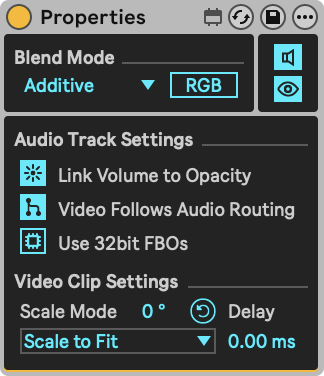
Dear Jean-Paul, No, I didn’t have a Properties device in the track. But now I’ve installed one and it works. Great! Thanks a lot.
The behavior is still weird though, because without Videosimpler I don’t need the Properties device.
Ah damn, not really. It worked in one channel, but in all the others, it doesn’t work.
Maybe I should also mention that I use a Drum Rack with several Videosimplers as an instrument.
Now that I’ve added a Proberties device per channel, and because I thought it might also have something to do with the top-down hierarchy, unfortunately, everything is back to how it was. Sorry. It actually worked for a moment in one channel. Not anymore now.
Could you share your Live Set so I can take a look? Just the .als file or the relevant tracks thereof is enough.
WirsindCool-Video.als (685.1 KB)
Like this?
Yes, thanks! What’s causing the issue is the Beat Flash device on the Main track. The reason for this is that it behaves like a generator, creating a black, non-transparent background.
Looking at the shader code, Alpha is set to 1, so the output is always fully opaque and any transparency in the input is lost. Considering the mixer and Video Simpler’s envelope control Alpha, none of this makes it through the Beat Flash device, making everything fully opaque at all times.
To solve this, simply move the Beat Flash device to a seperate track so that its output is blended additively with the rest of your composition.