Hi,
I’m using the Video Recorder included with Videosync 2 and can’t get it to record at 24fps.
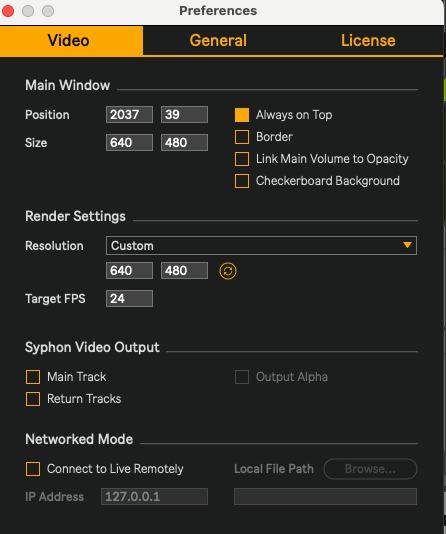
My video clip is 24fps and Videosync’s Target FPS is set to 24. I’ve tried setting Recorder’s FPS to both Auto and Custom 24, but in both cases the resulting .mov is approximately 60fps (Quicktime reports 60.02–60.04 encoded FPS).
I’ve also tried both H.264 and JPEG, with the same result.
The recording itself works fine - I just would like the resulting file to remain 24fps rather than creating a 60fps file when there’s no need for the additional frames.
Is there another setting that determines the recorded file’s frame rate?
Thanks!
I’d be so grateful for any pointers on this! Thanks!
Hi Jake, thanks for your patience and for bringing this up. I’m investigating this now. So far it’s quite a journey and appears to be a bug on our end.
You could consider using OBS Studio or Syphon Recorder in the meantime.
Hi Jean-Paul, thanks so much for letting me know this.
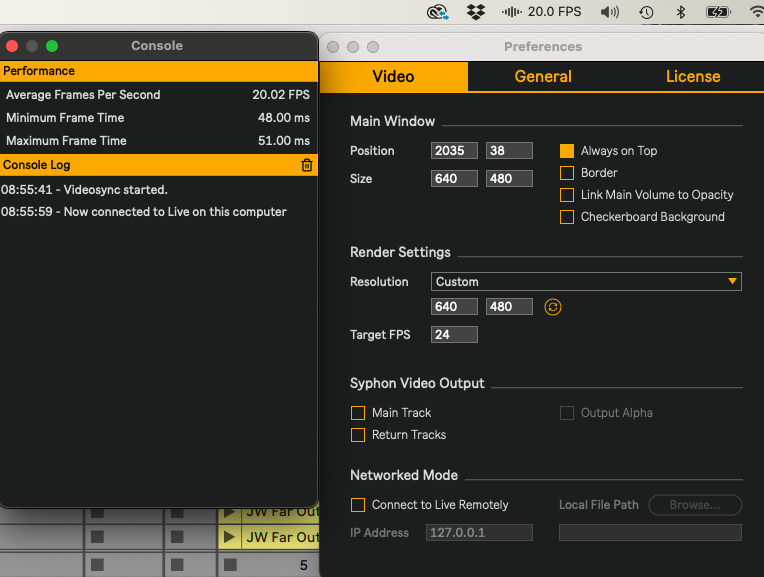
In case it’s relevant: I’m also finding that when setting the target 24fps in Preferences, Videosync is reporting only 20fps in the console and menu bar. When the target is set to 60fps, it does report 60fps.
Thanks again for looking into this. I will try OBS in the meantime!
That is as expected. On macOS, Videosync can only output at framerates that evenly divide the display’s refresh rate. In the case of a 60Hz display, dividing 60 by 24 results in 2,5, so Videosync can’t output at 24 FPS because 2,5 is not a round number. If you’d use Videosync on a 120Hz display however, then 120 divided by 24 results in 5, which is a round number, so in that case 24 FPS is supported.
Clearly this is just a technical limitation of Videosync. It could be that this limitation will be lifted at some point in the future, but I can’t make any solid promises on that.
On Windows, Videosync does not have this same limitation.