If the VideoRecorder is recording (in Main track) Ableton playback can only be stopped by closing the VideoSync window.
On Windows.
Not so much of a urgent problem, just a nuisance.
Any ideas?
Hi John,
Sorry to hear about that! That sounds very unusual and new to me. I have a few questions:
- Which version of Live?
- Which version of Max (bundled or not)?
- Which version of Videosync?
- Which version of Windows?
- Are you using any Control Surfaces other than the Showsync one?
- What Sample Rate is Live set to?
- What audio device and driver are you using?
- What does your Live Set look like? Or what are the least amount of steps required to reproduce the issue?
12.4.5
9.1.5 bunled
2.1.11
11 25H2
No
48000
FlexASIO
Very simple, one video file, one Video Simpler with an jpeg, two ISF Shader (dial-o-meter and Digital Number).
Super fast PC with i9 and RTX 5090
But does it with all my projects.
What version of FlexASIO are you using? Its Github Releases page lists the following for v1.10b:
This is a hotfix release to address a regression in FlexASIO 1.10 that can result in hangs/freezes in some applications (most notably, Cycling 74’ Max 8) that do not signal
outputReady()for the lastbufferSwitch()while stopping. See #235.
FlexASIO 1.10b
I’ll have a look at github.
If you’re using 1.10b that should resolve the issue, based on that info.
What happens when you use the regular MME/DirectX driver?
So I’m using the fi, so that’s not it.
It’s not that much of a problem. Closing VideoSync and opening again is quick, when using the video recorder.
More info; Ableton Live doesn’t accepts any keyboard or mouse input while Video Recording is recording, even the mouse cursor doesn’t change.
The whole user interface is dead, the display does update normally.
What happens when you use the regular MME/DirectX driver?
I tried, same result.
I’m specifically referring to this section in Live’s settings. If you set it to MME/DirectX, does it still freeze while recording?
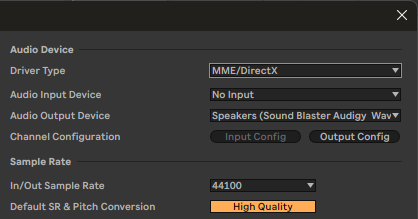
I honestly can’t see why Videosync or Video Recorder specifically would be the issue here, and would assume that what you’re seeing is rather a symptom of another issue, most likely to do with audio drivers.
I’m not able to reproduce the issue on my end. I am however able to make Live crash rather easily when finicking with FlexASIO settings. Considering we haven’t heard about this issue from anyone else, it’s hard to say what else it could without more data or another point of reference. If you have any more pointers, or could provide specific settings of your FlexASIO setup I could consider taking another look.
Same result with DirectX audio.
I say, the moment play starts with Punch-in/out and Video Recorder is armed the Live user interface doesn’t accept any input, however mouse clicks are buffered as the moment I terminate VideoSync those mouse clicks are executed.
Btw, Videos are recorded correctly, only with a couple of ghost frames at the beginning.
More info. An empty Live, I drop a Video Recorder, set File destination and press record, Live becomes unresponsive but playback works normal, black video is created, close VideoSync and Live becomes responsive again.