My first profile is not working

Hi. I’m a musician with loads of Max experience but now I’m doing DMX for the first time.

I assume that my lighting fixture is a knockoff of a known fixture, but I’m too much a newbie to know what that might be. It calls itself a Junman on Amazon: Amazon link. I have two of them.

Here is the product manual.The DMX mappings are on page 7-8 of the manual. I’m working in 10-channel mode.

I just downloaded the Beam package today, ver. 1.0.2, running on Max/MPS ver. 9.1.4. I also read the entire profile instruction manual and worked through it to build my profile file, twice. The first time I used some premapped channels, and the second time I did every channel by hand. Both of them respond to the Test button - all lights come on - but they won’t do anything else.

Here are my json files, version 1 and 2:

Junman par.sbf (2.0 KB)

Junman 6x18 RGBWAUV.sbf (2.3 KB)

The strange thing about my profiles is that when I view either of them in the [beam.patcheditor] object is that I don’t see any of the individual mapping variables & thus can’t give them names.
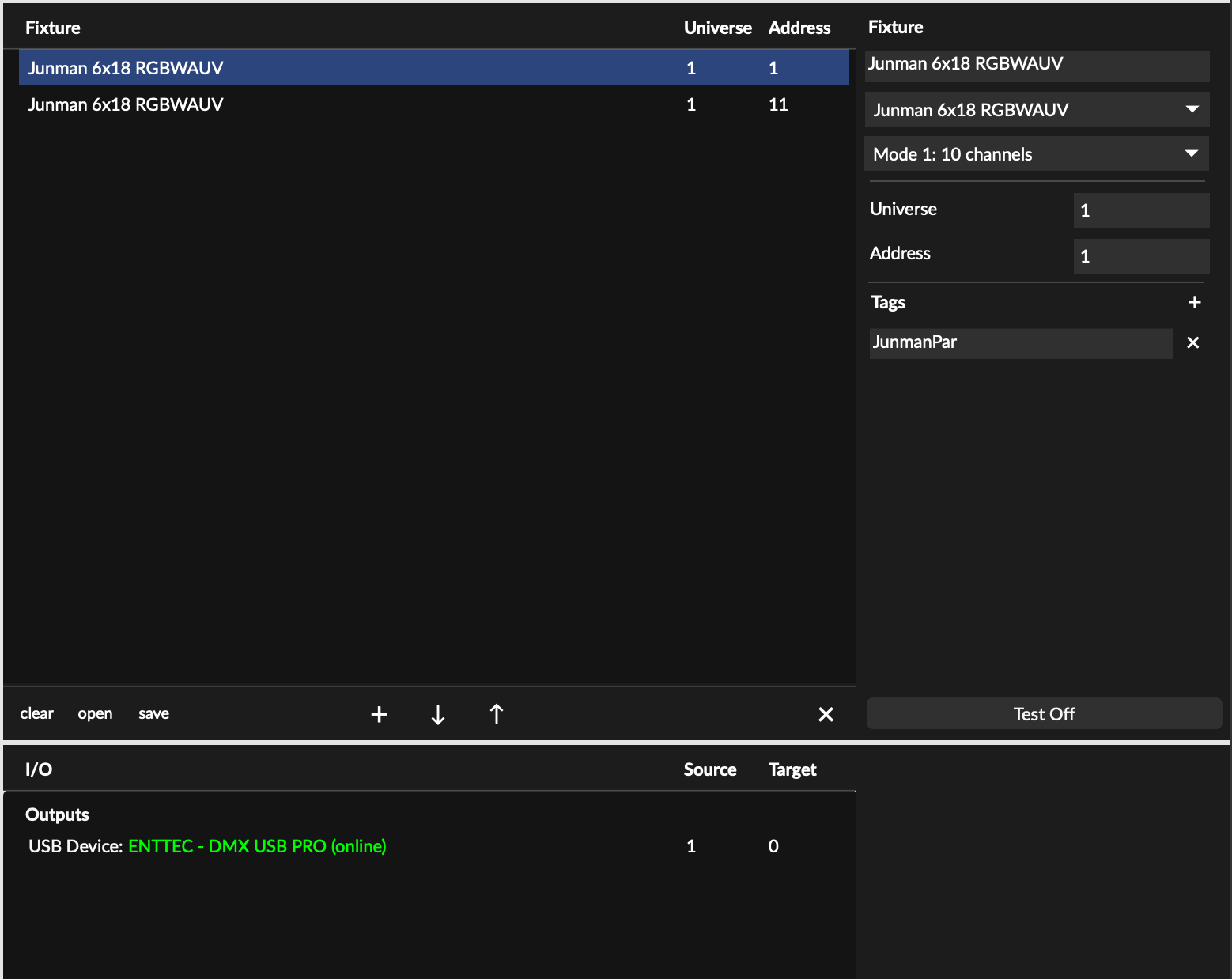
I looked at the json file of my profile and compared it to one called “Generic RGBAWUV.” Structurally, they seem similar. I don’t see any major problems in my profile, as far as I can tell.

Hopefully there is some simple aspect of this that I haven’t learned yet. I’d love to learn how to make this work.

Also when I quit Max and reboot, my beam.patcheditor object doesn’t remember what fixture I was using previously. How do I toggle that on? And if I try to open one of my profiles by selecting “open” on the beam.patcheditor, they do not load.

Thank you for any help and wisdom,

Doug

PS: This tutorial was incredibly helpful for me to get started! Many thanks to Andrew Robinson.
Hey Doug, welcome to the forum!

I actually just noticed that I’ve already responded to your email as well, but will also reply here.

Looking at the product manual, I made the following fixture profile including all three modes:
JUNMAN 6x18W RGBWAUV 6 in 1 Wireless.sbf (4.7 KB)

I made this profile before reading this thread and checking your attempts at making the profile yourself. Your attemps are actually very similar to my profile, the only difference being that you’ve entered a few custom channel- and modulation names. There’s nothing wrong with that, but generally we try to do this as little as possible so that the list of available modulations to choose from stays as short as possible when using many different fixtures in patch (the more custom names, the longer the list of options). The best way to do this is by using the premapped channels.
Regardless, as far as I can see, your self made profile should work just fine.

What I see in your screenshot of [beam.patcheditor] is exactly what I’d expect. The only thing you really have to do there is add the fixtures to your patch and assign tags to any group of lights (and those tag groups can overlap!). In this case, simply give both your fixtures the same tag name.

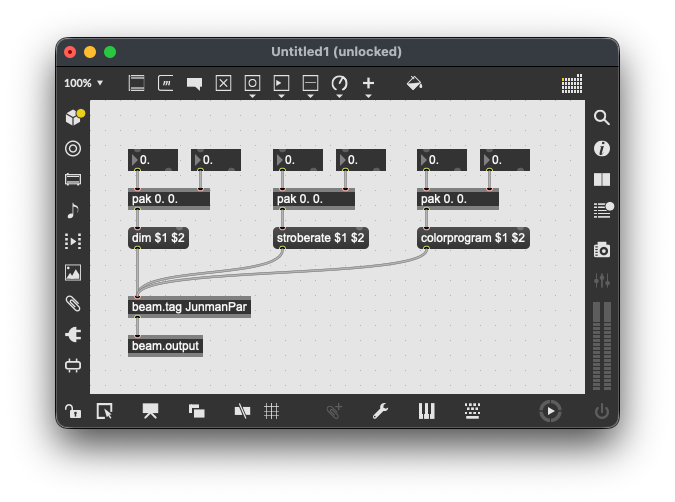
In Max, you can then control the individual lights by making a list of two values and prepending it with a modulation name:

Beam automatically divides the amount of values in a list over the amount of fixtures in a tag. So let’s say you have 20 fixtures in a single tag, then sending dim 0. 1. will light up fixtures 11-20. Similarly, sending dim 1. 0. 0. 0. will light up only fixtures 1-5. Appending 20 values to dim will give you individual control over each of the 20 fixtures within that tag.

Regarding [beam.patcheditor] not remembering the patch: this is by design. It is simply a visual representation of a dict that is loaded in [beam.core] that you can interact with. Like any dict in a patch it will have to be stored somewhere. The help patcher of [beam.core] shows how to do this:

Hi and many thanks for your reply!

My guess at this point is that there is some DMX knowledge that is assumed of users that I don’t have yet. It still isn’t clear to me how I’m supposed to know what keywords to prepend in my messages to the beam.tag object, or how to address specific modes.

For example, before made my custom names,I tried prepending “red” and “Red” in front of the data to control red, and then sent that to the beam.tag object for my fixture. But nothing happened. I tried this with several parameters. (Is Beam case sensitive?)

While having these problems, I wondered whether I also need to encode the fixture mode that I’m using into my messages to the fixture somehow, or is it sufficient that I’ve set the fixture to receive data in that mode. I assume the latter.

Regarding the beam.core object, I didn’t see it stated in the help files or tutorials that it was necessary in one’s patch. The guy in the tutorial video I referenced in my first post said that one is embedded in the bpatcher patch editor, and so I assumed that it would be superfluous to include a beam.core in my patch. Now though I’m guessing that I should include one in every patch that uses beam if I want to have the beam patch be remembered. And if that is true, should I also load my desired sbf patch into that dictionary rather than using the patch editor bpatcher to load my patch? I guess that this would ensurethat the correct patch will load from the dictionary into the patch editor every future time I open the patch.

Thanks for any additional wisdom,

Doug

My guess at this point is that there is some DMX knowledge that is assumed of users that I don’t have yet. It still isn’t clear to me how I’m supposed to know what keywords to prepend in my messages to the beam.tag object, or how to address specific modes.

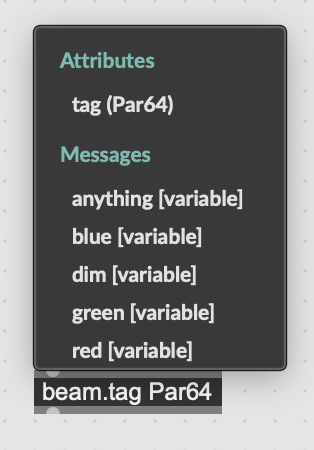
You can see the available parameters within a tag by right-clicking the inlet of beam.tag:

The available parameters are defined in fixture profiles. You can open any fixture profile (.sbf) in a text editor or Beam’s Fixture Editor.

Is Beam case sensitive?

Yes, it is!

Regarding the beam.core object, I didn’t see it stated in the help files or tutorials that it was necessary in one’s patch.

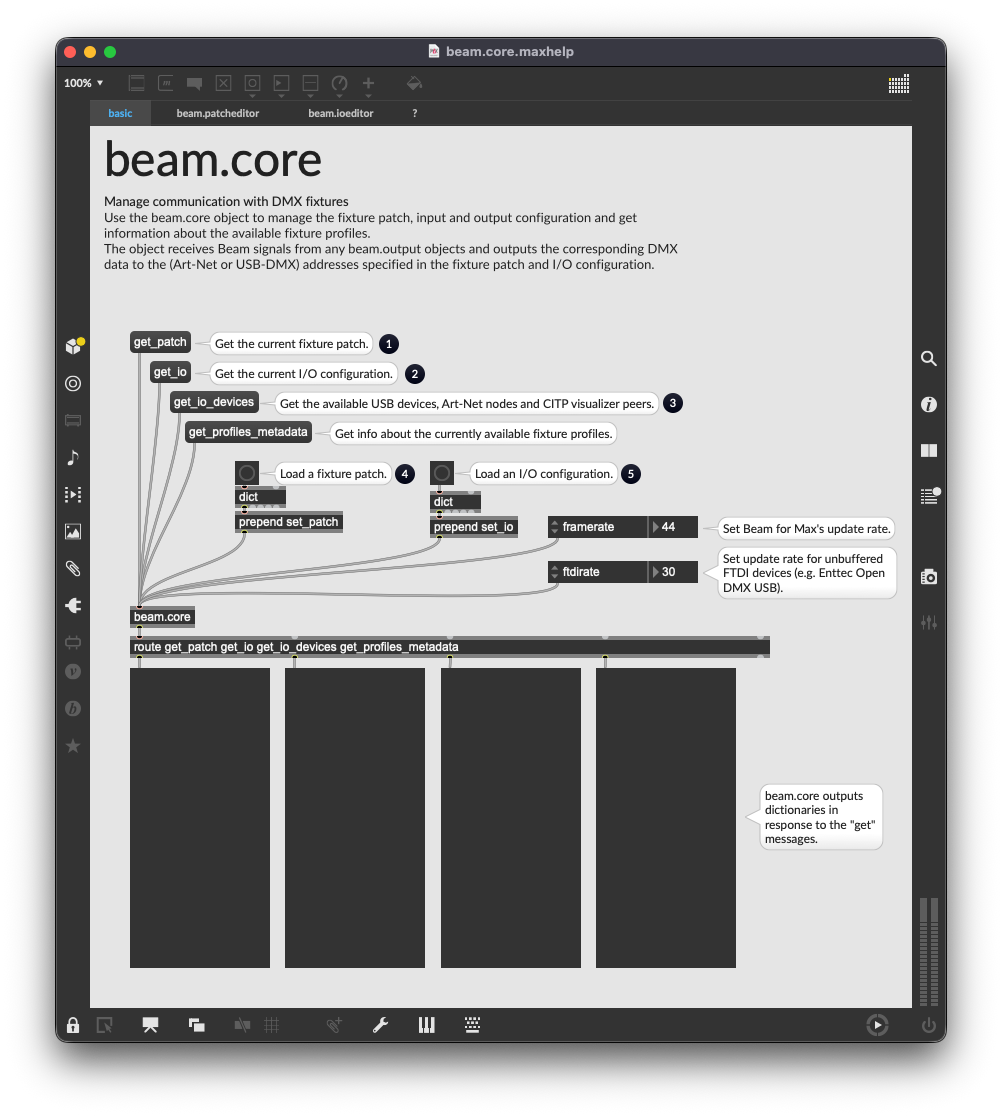
Beam’s engine starts running in the background as soon as you have one Beam object in your patch. [beam.core] represents Beam’s engine, but it is not strictly necessary for the object to be present in your patch. It is an object that allows you to interact with the engine for things such as storing/recalling a Beam patch.
[beam.patcheditor] by itself does not store patches, it is a user interface for configuring a patch, so once you load a patch into [beam.core], you can view and edit it with [beam.patcheditor]. You can press the Save button to store the patch as a JSON file on your harddrive, but [beam.patcheditor] also outputs a dictionary whenever a change is made to the patch. In other words, you can store the output in a [dict @embed 1] to embed it in your patcher. Then just attach a [loadbang] to it, and you can easily recall a patch that way by prepending it with set_patch and sending it into [beam.core].

Settings in [beam.ioeditor] do however persist between sessions. So in other words, you don’t have to reconfigure your DMX interface every time, but you will have to load a specific patch every time using [beam.core].

Thanks again for the valuable information. I feel that I’m getting a solid grasp now of how to control my fixtures. Most especially, it is is incredibly helpful to know how to see the list of available params via the beam.tag object using right click/control click.

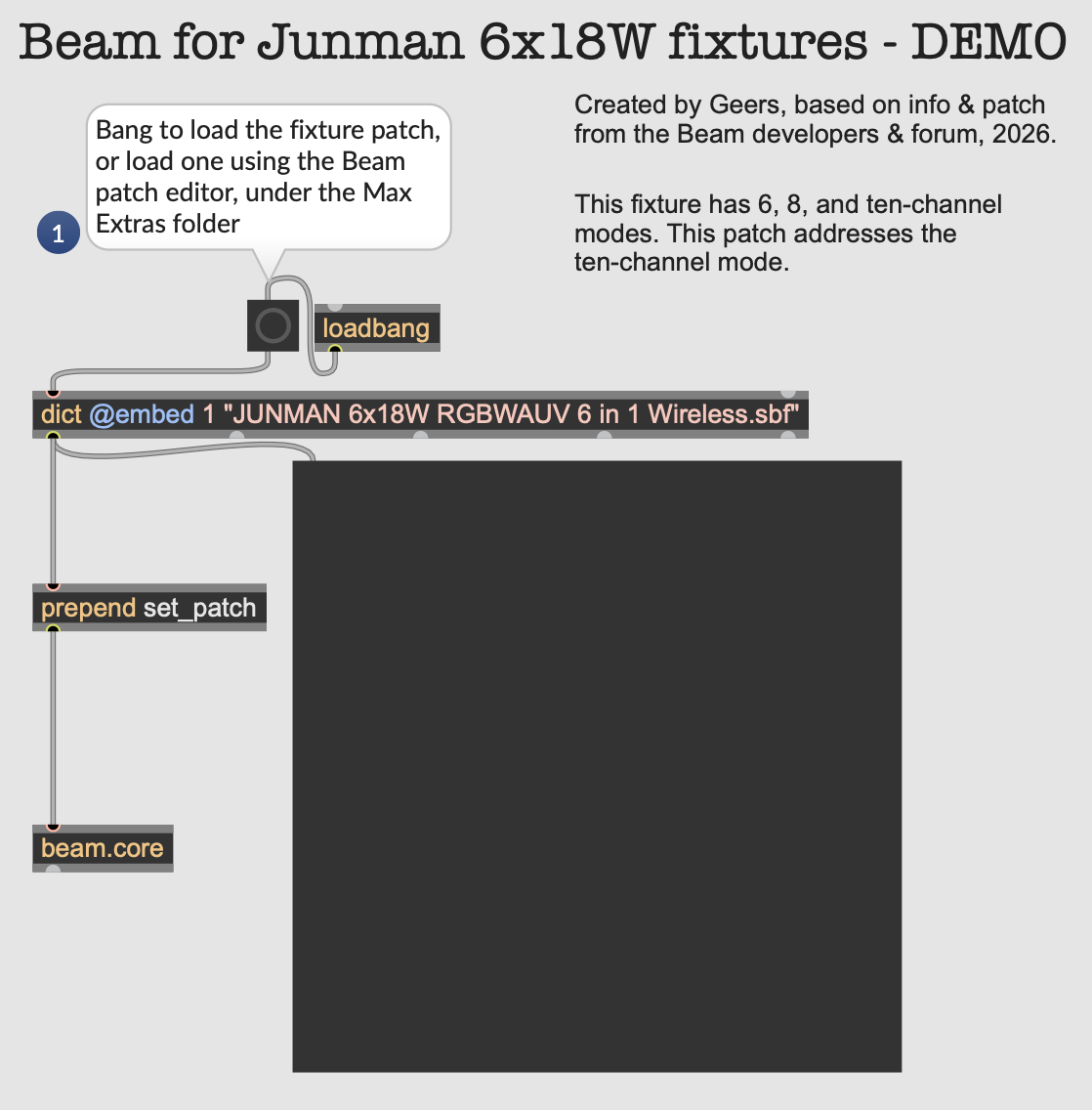
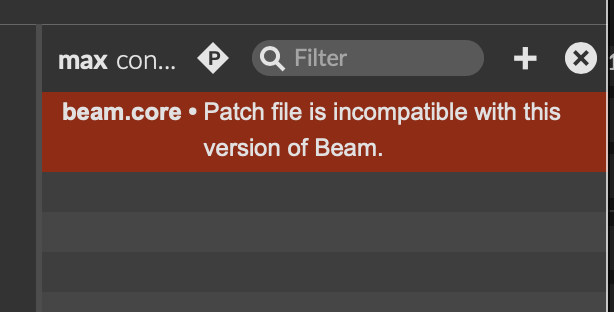
One odd behavior I’ve found is that when I try to load the fixture profile sbf that you created into a dict in Max, I get the error message “beam.core: Patch file is incompatible with this version of Beam.” However when I load via the patch editor bpatcher, all works perfectly.

Here is a screenshot of the relevant corner of my patcher:

One other minor confusion I have is the “anything” parameter on my fixture. As far as I can tell, it does nothing. Is this common, perhaps as a way for a developer to add a custom behavior? My current plan is to ignore it, but of course if it would open the door to more control of the fixture, I’d love to know about that possibility.

Best wishes,

Doug

The reason you see this error is that this is not the right way to add your fixture profile to Beam for Max, as it is not a patch file: it is a fixture profile file. All of the default fixture profiles are stored in the Beam for Max package folder, but adding fixture profiles anywhere in Max’s Search Path will allow Beam to find them when it first initializes.

The steps are listed on this page of the Fixture Editor manual, though I’ll admit that these steps should be easier to find.

Regarding the “anything” parameter: I can’t find any mention of this in the manual, and there is also not such parameter in the fixture profile, so please let me know if I’m missing something.