Thanks for sharing!
What’s good to understand is that video effects operate in the exact same way as audio effects. What I mean with this is that for example with Audio Tracks, while a video clip is playing, the video is processed by effect devices on that track, and then the mixer determines how much of each track ends up in the final output.
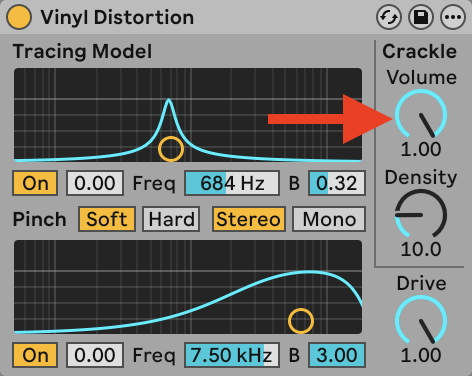
Some Videosync effects (like Lava, Voronoi, and in some cases ISF Shader) have a continuous output. This means the effects generate output at all times, and not just when a video clip is playing. You can compare this for example to the Vinyl Distortion effect, which has a “Crackle” dial that will always output the sound of crackle, regardless of whether a clip is playing, or even regardless of whether the transport is playing:
This is different from how much video editors operate. For example with Premiere or Davinci, you generally apply video effects/filters to clips, not to tracks. Neither of these applications are meant to be used for live/realtime playback though, and that’s the major difference with Videosync.
Back to your Live Set:
The top video track has a clip. The content of the clip is passing through some video effects which create a continuous output. If you want to stop seeing this continuous output, either disable (by automating) the device that’s creating the continuous output, use it’s Dry/Wet parameter, or mute the track altogether to hide its output.
When it comes to how multiple tracks are blended together, this is determined by the chosen Blend Mode in the Properties device on each track/chain. For more info on this I highly recommend watching this video (or playlist), or reading this section in the manual.
Let me know if this helps!