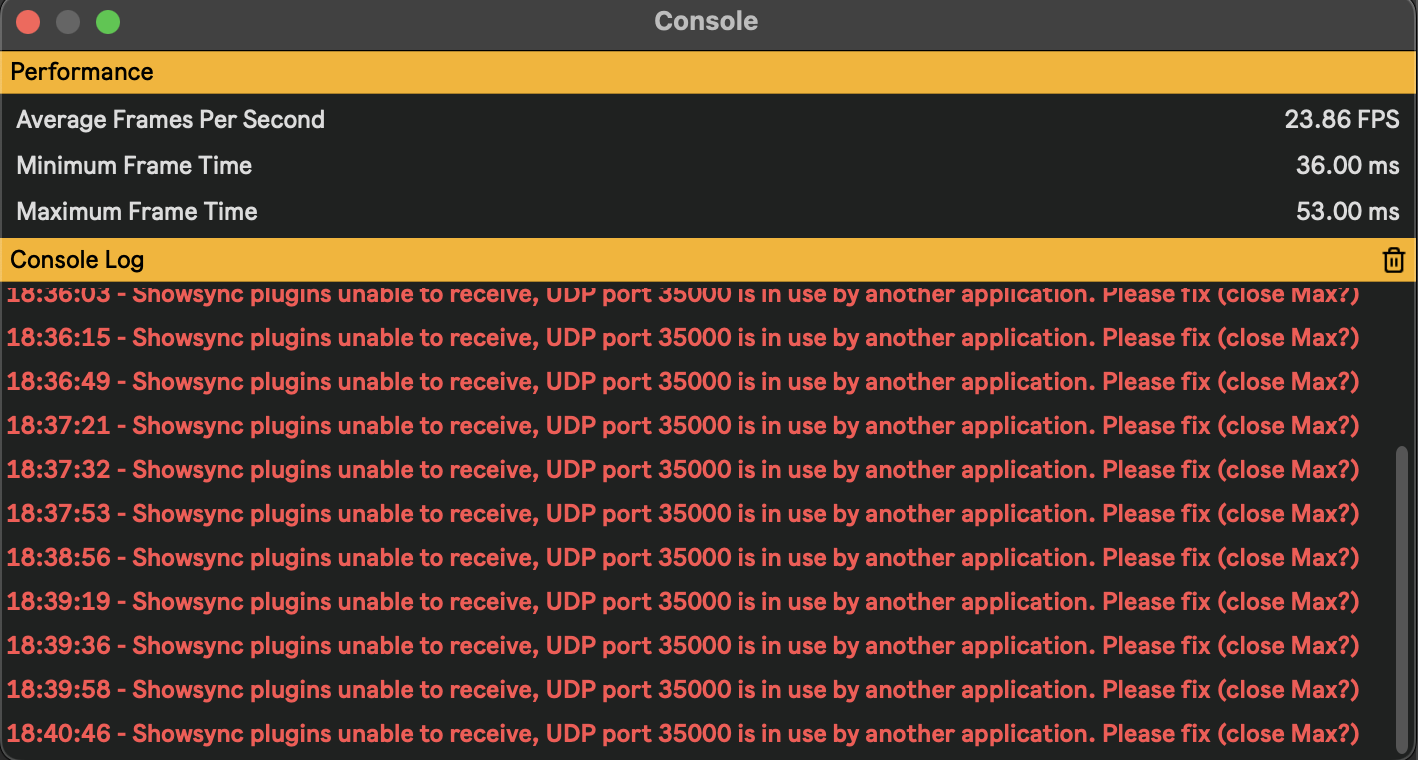
My Console keeps popping up with red text that says Please fix (close Max?) - if I close Max Videosync won’t work right? How do I stop this from popping up?
Max should actually be closed while using Videosync, as Max and Videosync both use the same network port to connect with Live. When you open a Max for Live device to edit it, the Max editor “steals” the connection with Live from Videosync, making it unable to exchange data with Live.
If you close Max, the connection between Videosync and Live should re-establish automatically, but in case it doesn’t, simply restarting Videosync should do the trick.
If the Max application was closed all along, then please let me know.
In case you were not using Max at all while this error appeared in Videosync’s Console window, then updating to Videosync 2.1.1 (which is now available) should improve things for you.
Thanks JP, I cannot restart VideoSync in the middle of a gig…
I’m running 2.1.8 and the popping-up of the console stops VideoSync output irrespectively whether Max is in edit mode or not. And the console window then becomes the window of focus, which, in my case, disables input from the attached Ultraleap controller into Live.
Sure, I run Maxforlive devices - but certainly not in edit mode.
Note that the timing (if at all) of the popping-up is unpredictable.
I desperately need to run Max with audio & video in the background of Live and VideoSync to overcome the sometimes very long file load times in Live.
- Live and Max do not need to output audio at the same time, and, on my external screen
- VideoSync and Max do not need to output video at the same time.
For the latter situation, I switch the visibility of the jit.window on/off with its ‘visible’ attribute.
In other words:
When ‘visible’ is disabled, the VideoSync output window is exposed - thereby masking the jit.window.
When ‘visible’ is enabled, the jit.window is exposed - thereby masking the VideoSync output window.
Any ideas on this?
Thanks. I Love VideoSync!
EDIT: The error messages in the console seem irrelevant to my VideoSync output. If I ‘unfocuse’ the console window or close it, things run as expected. Meanwhile, it seriously disturbs my workflow and could be disastrous in performance. In my opinion, the popping-up should be an option?
Hi JB,
The reason you are seeing the Console pop up is likely that you’re switching between Live Sets. Since you mention loading Live Sets takes a long time, this means that a considerable amount of data is being loaded into RAM memory. During this, Live usually becomes unresponsive and Videosync therefor loses its connection with Live. The error may seem inconsistent because not every Live Set takes as long to load, and once one has loaded, the errors will stop appearing as the connection will have been reestablished.
In more recent releases (2.1.1 and newer) we have implemented changes to make this error less likely to appear in these situations, but the fixes for this are in the Max for Live devices. Could you please verify that your Live Sets do not contain older versions of Videosync’s Max for Live devices?
For example, the first thing to check is whether the parent project folder contains copies of Videosync’s Max for Live devices. If yes, this likely means your Live Set uses outdated copies. I would recommend deleting the copies (or move them to another folder as backup), reopening the Live Set and relink the now missing devices to the ones in the Videosync/2.1 Devices folder in the User Library.
Thank you, JP, for your extensive answer. Your explanation about the reason for the popping up makes perfect sense.
Re: your method for finding outdated copies:
- When do you consider a copy ‘outdated’?
- How does that relate to a situation in which the set has been saved as ‘Collect all’?
When you use Collect All and Save while having the Files from User Library option checked, Live will copy files from the User Library (where the original Videosync devices are installed) to your project folder. In our case this is completely unnecessary, as Videosync will always install its latest version devices into the User Library at startup.
The downsides of having copies in your project folders is that there is no way to tell from which version of Videosync they originate, and that the copies will never be updated/overwritten automatically.
For example: if you use a device from the User Library/Videosync/2.1 Devices folder, and use Collect All and Save with the Files from User Library option checked, and you then update Videosync 2.1.0 to for example 2.1.9 (which could contain bug fixes for devices), Videosync will install its latest devices to the User Library, but never to any project folder, so your Live Sets keep using outdated devices.
Clear, thanks.
I’m running two M1 Macs, of which one for live backup. Upgrading to new machines in the near future is out of the question. For gigging, my rig has to be completely tested & stable. Ideally, I should limit myself with regard to updating to new VideoSync versions until the purchase of new laptops… However, this is not the reality, of course.
On the other hand, once a set is running without issues, it needs ‘finalising’: enabling relocation to other folders or computers - for backup, organisation or archive. This is also the moment that updating stops. Hence my use of Live’s Collect All and Save facility.
’[…] there is no way to tell from which version of Videosync they originate.’ So yeah, that is definitely an issue.
EDIT: I keep having the console popups. Max is not running, but I’ve got plenty of M4L devices in my sets. It is precisely the UDP port 35000 that is causing the errors - see pic. But indeed, I think I got rid of the popups after updating all the VideoSync devices to 2.1. BTW, if you’re dealing with the VideoSync device updating situation, there is a trick to find out whether it is the latest version of a device or not. Use swap (keystroke q) and then monitor closely whether Live’s browser jumps to the equally named version in the VideoSync 2.1 folder. If it does not, and ‘collect all and save’ has not been employed during saving, one could be dealing with an outdated version.